We’ve all been there; the original remote is gone, and now you’re stuck flipping through menus with frustration. Luckily, the Philips universal remote can control nearly any device if you know the right code.
This guide will walk you through universal remote codes for Philips TV and other electronic devices. We also explain how to pair the remote with your device effortlessly!
In This Article:
Philips TV Remote Codes
The exact code for your Philips TV remote depends on your TV’s brand and model. You’ll need to try the codes listed for your specific brand until one works. Philips universal remote 4-digit codes are the most common, though some models use 5-digit codes.
| Universal Remote Control Brand | Philips TV Codes |
| Philips | 0247, 0222, 0807, 0022, 0310, 0122, 0408, 0002, 0520, 0621, 0919, 0210, 0430, 0020, 0901, 0422, 0402, 0521, 0109, 0715, 0322 |
| Philips-Magnavox | 0224, 0430, 0807, 0919, 0022, 0322 |
| Magnavox | 0109, 0919, 0247, 0402, 0807, 0502, 0715, 0224, 0408, 0002, 0430 |
| Roku | 4395, 2407, 2894, 2014, 0903 |
| Panasonic | 0901, 0007, 0345, 0416, 0739, 0618, 0718, 0696, 0807, 0039, 0608 |
| Samsung | 10814, 10702, 11903, 11030, 10812, 10030, 10060, 11060, 10178, 10766 |
| Sharp | 0509, 0202, 0224, 0907, 0913, 0502, 0603, 0002, 0228, 0111, 0813 |
| Insignia | 0213, 0323, 0115, 0520, 0318, 0911, 0504, 0914, 0247 |
| LG | 0606, 0609, 0324, 0102, 0502, 0307, 0217, 0802, 0002, 0435 |
| GE | 0310, 0601, 0901, 0114, 0803, 0006, 0007, 0018, 0312, 0704, 0103, 0002, 0806, 0835, 0502 |
| RCA | 0011, 0211, 0720, 0817, 0917, 0514, 0420, 0103, 0912, 0901, 0601, 0002, 0502, 0114, 0611, 0519, 0007, 0704, 0406, 0803, 0312, 0835, 0811, 0320, 0102 |
| Hitachi | 0707, 0507, 0002, 0519, 0802, 0808, 0502, 0410, 0515, 0607, 0715, 0710, 0315, 0324, 0815 |
| Emerson | 0626, 0705, 0605, 0805, 0520, 0614, 0327, 0316, 0632, 0324, 0104, 0703, 0002, 0505, 0924, 0304, 0305, 0906, 0604, 0134, 0519, 0004, 0128, 0006, 0005, 0706, 0247, 0506, 0106, 0903, 0115, 0502, 0826, 0027, 0105, 0804, 0228 |
| JBL | 0807 |
| Sony | 0639, 0414, 0708, 0902, 0801 |
| Sanyo | 0428, 0506, 0612, 0412, 0002, 0311, 0619, 0802 |
| Envision | 0002, 0009, 0502 |
| Hisense | 13523, 11660, 12183, 11314, 13949, 10748, 13953, 13519, 13950 |
| Sylvania | 0402, 0717, 0520, 0502, 0408, 0324, 0807, 0002, 0109, 0247, 0115, 0715, 0919 |
| Toshiba | 0618, 0041, 0719, 0512, 0627, 0506, 0517, 0419, 0437, 0111, 0613, 0112 |
| TCL | 6201, 6171, 6031, 2891, 6651, 5961, 1741, 5771 |
| Westinghouse | 0609, 0611, 0324, 0915, 0415, 0013, 0529, 0614, 0215 |
| Zenith | 0008, 0826, 0405, 0415, 0710, 0903, 0126, 0505, 0916, 0502, 0115, 0430, 0712, 0437, 0324, 0632, 0228, 0002, 0701, 0407, 0409, 0713, 0606, 0326, 0714, 0224, 0507, 0435, 0015 |
| Yamaha | 0618, 0102, 0002, 0502 |
| Vizio | 0709 |
| AOC | 0003, 0002, 0119, 0320, 0502, 0102, 0217 |
| Abex | 0120 |
| Dell | 0522, 0814, 0404 |
| BENQ | 0709, 0711, 0909 |
Philips Remote Codes For DVD Players
| DVD Brand | Remote Codes |
| Apex | 0615, 0845, 0425, 3895, 0245, 0965, 1675, 1025, 1405, 1065, 1245, 0945, 0045, 1235, 3825, 1105 |
| Emerson | 0975, 1612, 3855, 0445, 0205, 3815, 1185, 3745, 3885 |
| Element | 4305 |
| Hitachi | 3765, 0025, 0565, 0765, 0545, 1245, 0925 |
| GE | 0915, 3895, 1105 |
| Insignia | 2195, 3335, 0725, 2805, 1105, 3305, 2365, 3745, 2815, 0562, 4205, 1945, 3895, 0975, 3785, 3885, 0205, 3815, 0445, 2915, 0285, 1335 |
| JVC | 2385, 2945, 0395, 0155, 2535, 1145, 1685, 3805, 0755, 2025, 3015, 3795 |
| JBL | 0585 |
| LG | 2635, 4285, 3885, 0205, 2335, 2565, 1565, 3915, 0562, 2555, 0635, 2925, 3785 |
| Panasonic | 2605, 0165, 2595, 3975, 4005, 0545, 3105, 4175, 2965, 0595, 1215, 0385, 2395, 1195, 3775, 1075 |
| Philips | 0745, 3165, 1045, 1615, 2665, 0735, 3815, 2775, 3705, 2765, 1395, 2415, 1225, 3715, 0105, 3745, 4105, 2615, 2625, 2945, 0445, 2705, 0265, 3795, 1055 |
| Philips-Magnavox | 1225, 1055, 4105, 1615, 3795, 0735, 0745, 2945 |
| Magnavox | 4105, 0975, 2945, 3795, 0735, 1225, 0745, 3745, 0105, 3025, 1395, 0445, 3815, 1045, 2425, 3715, 0295, 1055 |
| RCA | 1165, 0215, 1105, 2905, 2465, 0146, 0915, 1645, 2755, 3945, 0955, 3895, 1135 |
| Samsung | 4451, 3765, 1305, 0075, 2185, 2285, 3555, 1535, 0255, 1725, 3865, 2325, 4125, 3085, 2485, 2725, 4095, 2995, 2345, 0565 |
| Sony | 4275, 0365, 4165, 3825, 3995, 0715, 3055, 2865, 2985, 0725, 2165, 0535, 2305, 0905, 3685, 0895 |
| Sylvania | 3745, 4215, 1612, 1672, 1731, 3855, 2405, 3815, 3875, 0445 |
| TCL | 2435 |
| Toshiba | 0682, 3495, 2145, 0735, 3065, 2475, 3325, 2175, 1735, 2835, 3795, 2545, 2295, 2435, 2135, 4145, 0115, 3075, 0015, 1745 |
Philips Universal Remote Control Codes For Blu-Ray Players
| Blu-Ray Player Brand | Remote Codes |
| HP | 4085 |
| Hitachi | 0925 |
| Insignia | 4205, 2365, 0975 |
| LG | 4285, 2335, 2635 |
| JVC | 2385 |
| Philips | 2415 |
| Panasonic | 2965, 2395, 4175 |
| Magnavox | 0445, 2305, 2425, 3855 |
| Samsung | 2325, 2345, 2725, 4125, 4095, 0075,+ |
| RCA | 0146, 0915 |
| Toshiba | 2135, 2475, 2295 |
| TCL | 2435 |
Philips Universal Remote Control Codes For Streaming Players
| Streaming Player brand | Remote Codes |
| Apple TV | 1664, 1093 |
| Roku | 4395, 2014, 0903 |
| Xbox | 2134, 2824, 2144 |
| Nvidia | 2744 |
How To Program Philips Universal Remote Codes
Follow these steps to program your Philips Universal Remote using the direct code entry programming method:
- Turn on the TV, DVD player, or other devices.
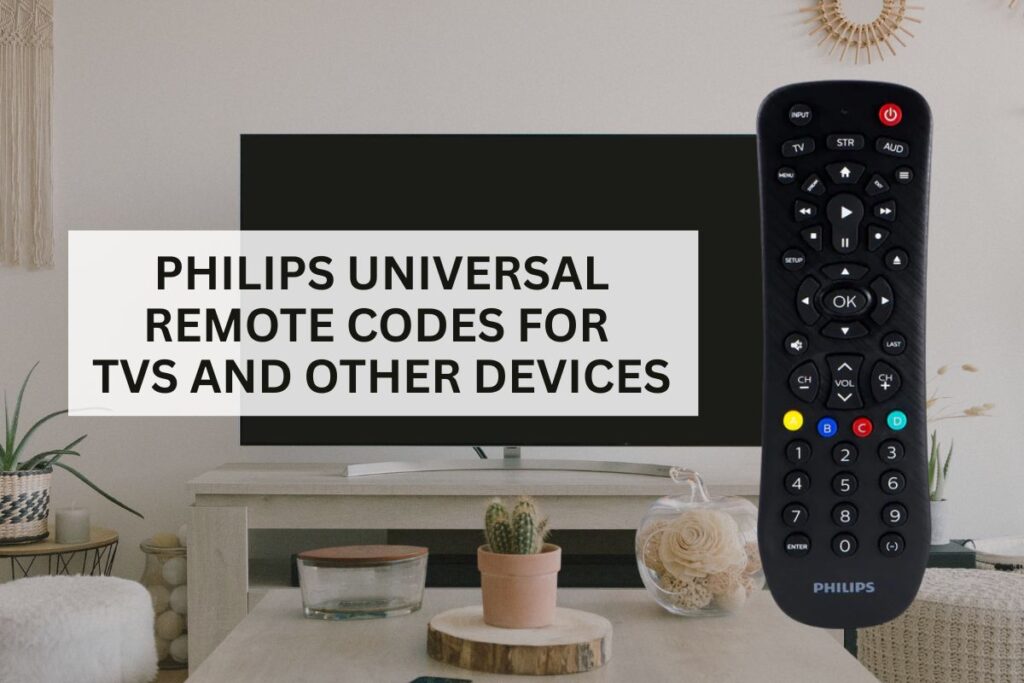
- Hold the Setup button until the red indicator light on the remote turns on and remains steady. If it turns off too quickly, release and repeat the step.
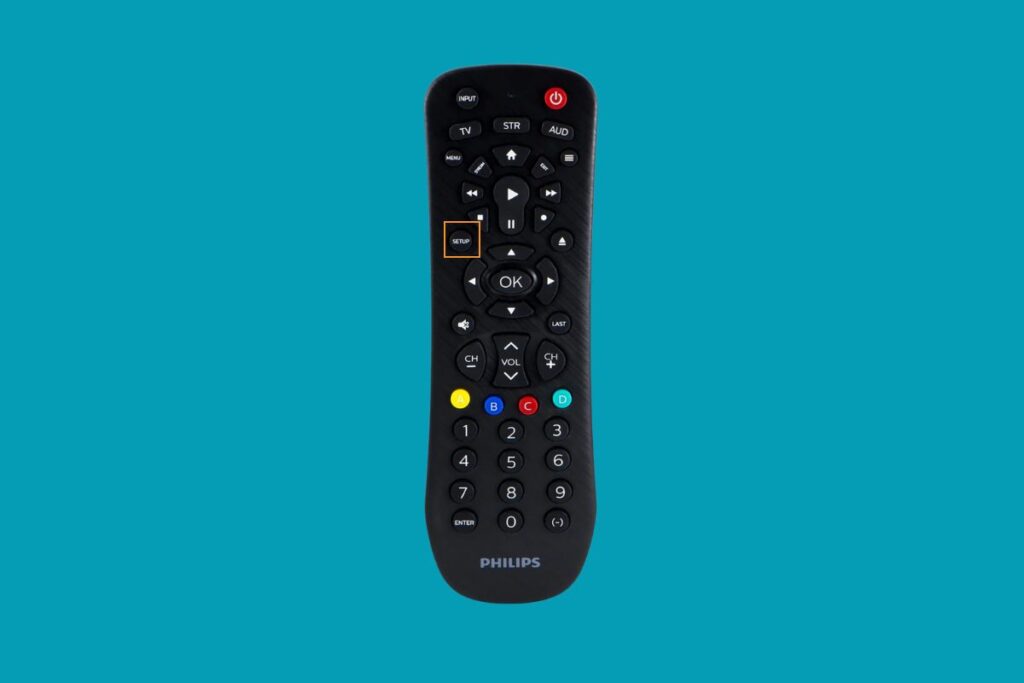
- Press the button that matches the device you’re setting up (TV, DVD, or AUX). The red light will blink once and stay on.

- Enter the compatible code for your device’s brand. The correct code can be found in the code table provided on Philips’ website or your remote’s manual.

- After typing in the code, aim the remote at your device and press the Power button. If the TV turns off, the programming process is successful. If not, repeat the process using the next one on the list of codes.

- Once your device responds correctly, press the Setup button again to save the configuration. Your remote should now be fully programmed for that device.
Philips Universal Remote Setup Without Code
If you don’t have the code for your device, you can still program your Philips Universal Remote using the auto code search method:
- Switch on the TV or other device you want to pair with the universal remote.
- Hold the Setup button on your Philips remote until the red light turns on. Release the button once the light stays steady.
- Press the button on your remote that corresponds to the device. The red light will blink and remain lit.
- Press the Power button once. The remote will start sending a batch of 10 codes automatically. You’ll notice the red indicator flashing as it cycles through the options.
- When your device turns off automatically, that means the remote has found a working code.
- Press the device button (e.g., TV) to lock in the code. Test the Power and Volume buttons to ensure everything functions properly. If not, repeat the process until you find the correct code.
FAQs
Can the Philips universal remote work with all devices?
Yes, Philips Universal Remotes are compatible with most major brands of TVs, Blu-ray/DVD players, and other audio/video devices. However, it’s always best to check if it matches with your device brand before purchase.
What should I do if my remote doesn’t work even after entering a code?
Try entering another code from the list for your brand, as sometimes the first one doesn’t match your device model. If none work, check the batteries or try the auto code search method. The last resort is to contact Philips support team.
Why isn’t the red light staying on when I press Setup?
If the red indicator light disappears right after pressing the Setup button, release and press it again. Make sure you’re holding it long enough for the light to stay on steadily.
See More Universal Remote Code List For TV Types: