You don’t need to worry if your Emerson TV remote is missing or not working. With a universal remote and the correct code, you can get back to watching in no time. This friendly guide will help you find the right Emerson TV remote control codes so you can get back to relaxing and watching your favorite shows in no time.
In This Article:
Emerson Universal Remote Codes
Common Codes For Different Emerson TV Models
Below are the most popular codes for each Emerson TV model:
| Emerson Model | Universal Remote Code |
| Emerson LC320EM2 | 11967 |
| Emerson LC390EM2 | 10171 |
| Emerson LC320EM3 | 10060 |
| Emerson EWC19D3 | 10178 |
| Emerson LC320EM4 | 12049 |
Different Code Lengths
Newer or smart universal remotes will be compatible with 4-digit or 5-digit universal remote codes. Meanwhile, older models require 2-digit or 3-digit codes to be programmed. Check your replacement remote manual to see which type it requires to save time.
| Remote Codes | |
| 2-digit codes | 84, 04, 35, 83, 77, 03, 32, 23, 01, 34 |
| 3-digit codes | 691, 537, 672, 654, 523, 534, 526, 655, 846, 533, 720, 527, 536, 528, 720, 532, 777, 544, 526, 632, 657 |
| 4-digit codes | 3203, 0181, 3013, 3025, 0205, 0263, 0650, 3011, 3186, 3015, 0198, 3008, 3010, 3005, 3012, 3218, 0207, 3031, 0490, 3204 |
| 5-digit codes | 12183, 10171, 10463, 11963, 11665, 13559, 10180, 10451, 11394, 11909, 11886, 13623, 11864, 11661 |
Emerson Television Codes For Different Remote Brands
Different remote brands require different codes. Check out the table below to find the correct code:
| Remote Brand | Emerson TV Codes |
| RCA | 1027, 0171, 1046, 0463, 1038, 0236, 1009, 1394, 0451, 0154, 1003, 1011, 1030, 1031, 1004, 1021, 1012, 1018, 0180, 1033, 3559, 0178, 1006, 1024, 1028, 1023, 1029, 1963, 1010, 1864, 2183, 1002, 1886, 1019, 1944, 1661, 3623, 1665, 0623, 1025, 10171, 13559, 11661, 12183, 025, 030, 006, 029, 017, 005, 012, 023, 010, 026, 018, 028, 032, 004, 011, 008, 024, 027, 031, 052, 009, 054 |
| Philips | 12210, 0021, 1451, 0041, 0291, 0441, 0731, 0031, 2171, 12001, 0281, 1461, 1251, 5341, 0001, 0691, 0931, 13700, 1251, 10005, 0041, 1221, 1371, 18503, 12359, 1551, 13919, 18358, 13229, 17000, 1381, 1631, 15659, 18918, 15722, 1931, 13925, 14102, 15526, 1371, 207, 263, 205, 388, 490, 114, 206, 240 |
| GE / UltraPro | 0031, 0041, 2761, 0021, 1221, 5341, 0731, 2171, 1461, 1371, 0281, 1931, 1251, 0041, 1451, 1631, 2191, 5221, 4831, 1611, 1551, 0701, 0691, 1381, 0931, 1701, 1251, 5231, 4741, 1221, 0371, 1261, 4701, 3451, 4751, 4761, 4911, 1681, 0451, 0851, 0271, 0291, 029, 037, 032, 049, 027, 177, 031, 034, 004, 026, 179, 014, 038, 042, 024, 171, 041, 025, 123, 012, 006, 036, 051, 028, 130, 046, 030, 147, 039, 233, 162, 191, 009, 023, 0356, 176, 033, 210, 124, 047, 250, 135, 189, 053, 227, 252 |
| One For All | 1909, 0556, 0714, 1394, 0486, 0178, 0668, 0037, 0371, 181, 146, 11394, 10451, 163, 000, 178, 180, 182, 10171, 036, 184, 150, 185, 282, 11864, 177, 039, 211, 10463, 030, 10178, 11944, 236, 058, 147, 270, 068, 135, 158, 463, 280, 624 |
| Magnavox | 0041, 0040, 0059, 0114, 0127, 0070, 0038, 0091, 0130 |
| Xfinity | 11963, 10270, 10463, 11905, 11665, 11909, 10178, 10855, 11913, 11911, 10280, 10183, 10623, 10181, 11661, 10180, 10002, 10282, 10036, 10451, 10019, 10032, 10171, 10179, 10702, 10236 |
| Spectrum | 1361, 1241, 0451, 1020, 1172, 0180, 1661, 0154, 1014, 0463, 1997, 1019, 1017, 1023, 1018, 0236, 0171, 1027, 1665, 1251, 0178, 1963, 1864 |
| Blackweb | 1173, 1141, 0032, 0023, 3014, 0027, 2455, 0045, 0231, 0037, 2324, 0034, 0039, 0179, 0040, 0198, 3014, 2454, 3014, 3109, 3110, 0130, 2477, 0252, 2467, 0249, 3022, 2471, 0259, 3109, 2423, 2472, 3014, 3031 |
| Sky | 1937, 0742, 0115, 0652, 0199, 0389, 0514, 0696, 1065, 0772, 0398, 0683 |
| Emerson (Direct) | 3010, 3012, 3031, 3008, 3013, 3218, 3204, 3005, 3011, 3203, 3025, 3015, 0181, 0263, 3010, 0490, 0205, 0650, 3186, 0198, 0207, 523, 11864, 536, 654, 03, 533, 11909, 527, 10180, 632, 13559, 691, 534, 32, 04, 537, 526, 11661, 846, 77, 10463, 544, 84, 655, 01, 23, 10171, 11394, 11886, 657, 777, 35, 11963, 12183, 672, 535, 28, 720, 13623, 10451 |
| Inteset | 11886, 13559, 11661, 10037, 11864, 12183, 10171, 11394, 13623 |
| Brightstar | 902, 200, 617, 103, 614, 620, 901, 602, 022, 201, 101, 607, 615 |
How To Pair A Universal Remote With Emerson TV
Here’s how you can sync your universal remote with your Emerson television using the remote codes above:
Step 1
Begin by turning on your Emerson TV.
Step 2
Before you proceed, double-check that the universal remote has fresh, working batteries. Weak or dead batteries can interfere with the programming process.
Step 3
On most universal remotes, there is a Setup button. Press and hold the Setup button until you see a red indicator light or LED blink or stay solid. This signals that the remote is in setup mode and ready to receive a code.
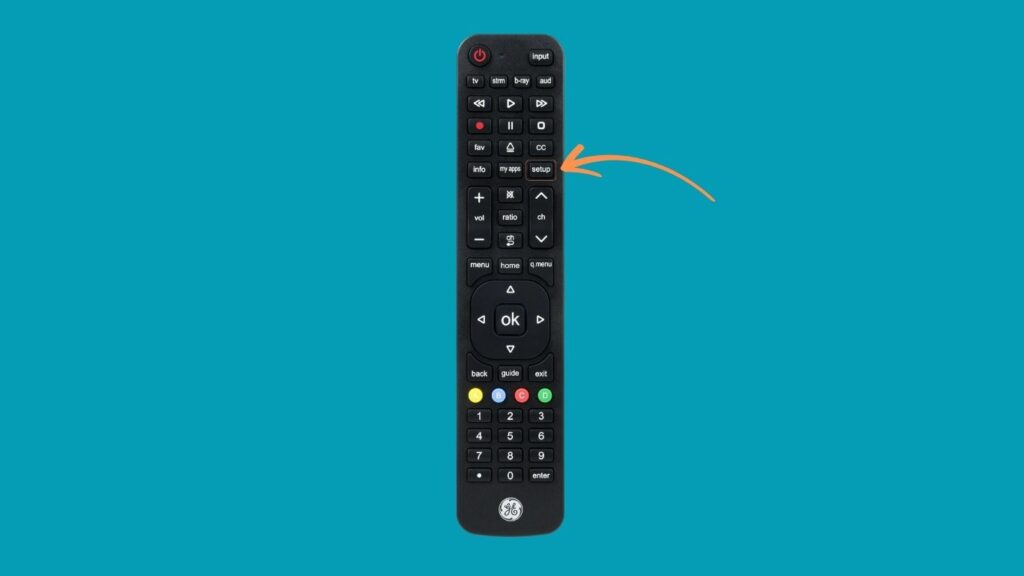
Note: On some remotes, you may also need to press the TV or Device button after entering Setup mode.
Step 4
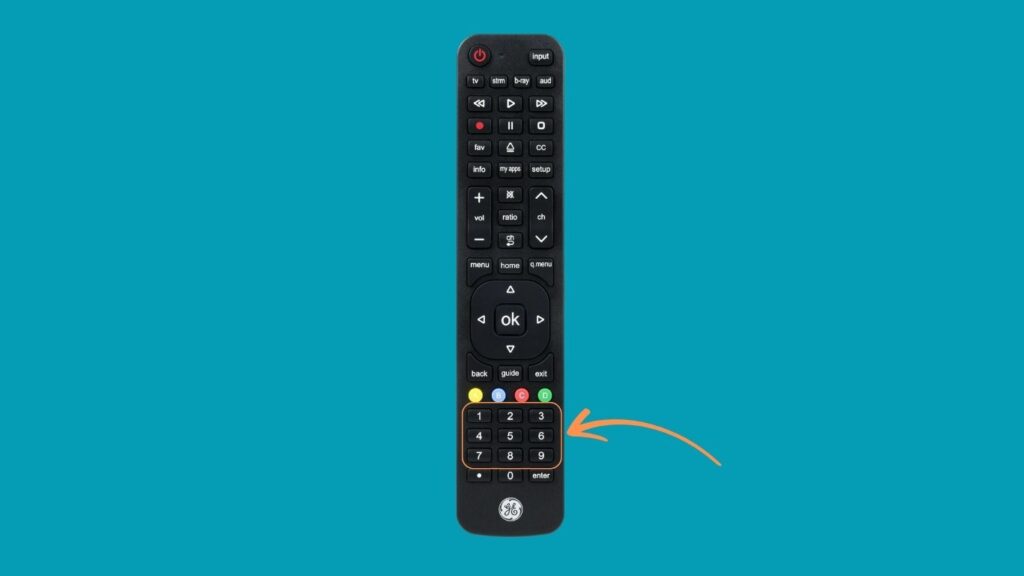
Use the number pad on your remote to input a valid Emerson TV remote code. You can find a list of valid codes above, such as 10463, 10171, or 11661, depending on your remote brand. If you’re not sure which code to start with, try the ones listed under your remote brand (e.g., RCA, GE, Philips).
Step 5
After entering the code, try to control your TV using the remote. For instance:
- Press the Power button to see if the TV turns off.
- Try changing channels or adjusting the volume.
If the remote doesn’t work, it means the code was incorrect. In that case, repeat Steps 3 and 4 using a different code from the list until you find one that works.
Step 6
Once the correct code is entered and the remote successfully controls the TV, press the Setup button again (or follow the instructions specific to your remote) to lock in the code. The indicator light should blink or turn off, confirming the programming.
FAQs
Can I Use The Universal Remote Without The Original Remote?
Yes! The original remote is not required for pairing or operation. All you need to do is manually turn on your Emerson TV using the power button on the TV itself.
My Remote Doesn’t Work After Programming. Why?
If your universal remote doesn’t work after you’ve entered a code, the most likely reasons are incorrect or incompatible remote code, low or dead batteries in the remote, signal interference, or defective remote.
Is There Any App To Program The Universal Remote To My Emerson TV?
It depends on what remote brand you’re using. Some, like All For One, offer an app for hassle-free programming.
See More Universal Remote Code List For TV Types: